Table of Contents
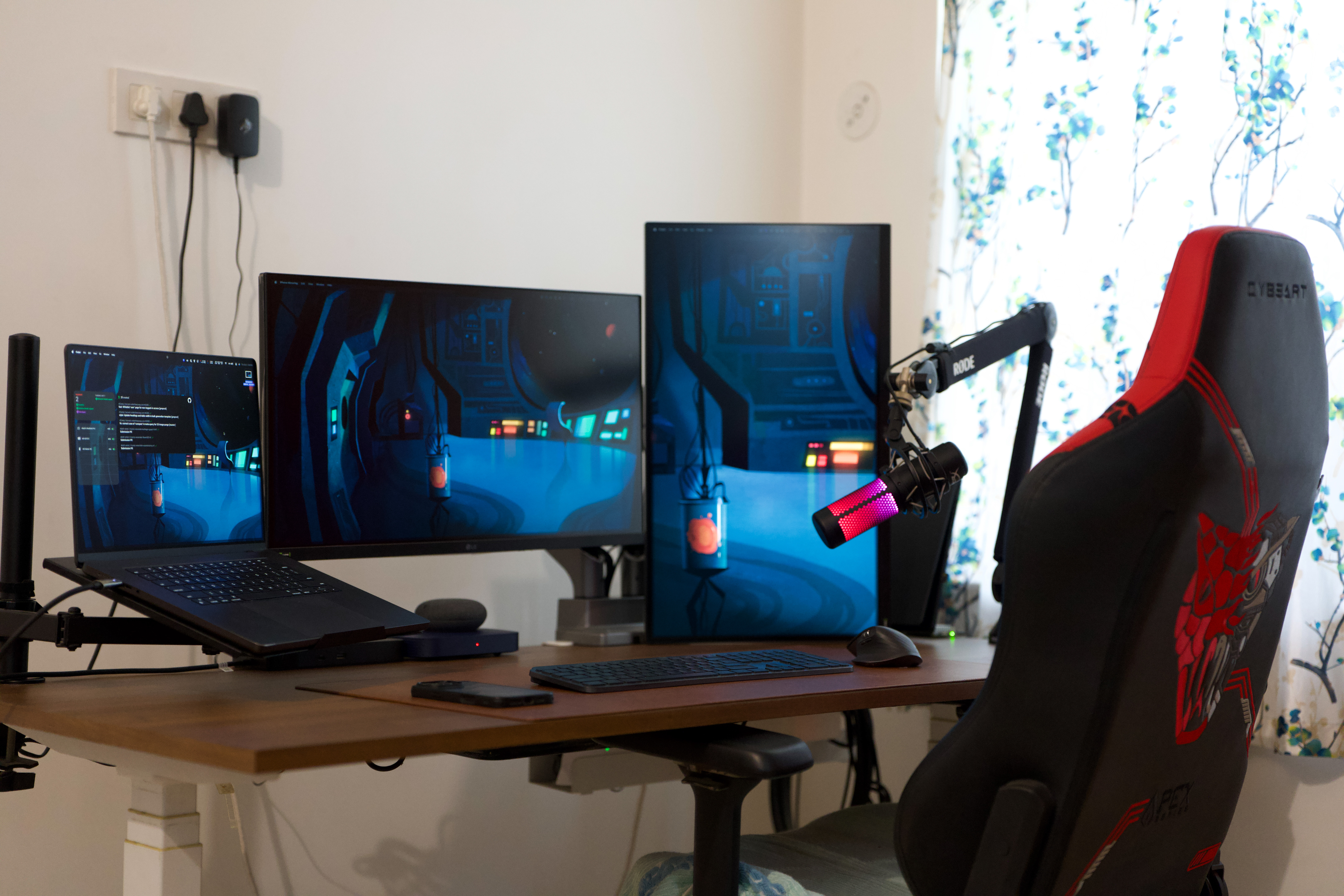
Welcome to my workstation setup tour! As a Senior Software Developer and tech enthusiast, I’ve carefully curated a high-performance workspace that balances power, efficiency, and aesthetics. Here’s a breakdown of my setup:
🎯 Primary Workstation
- Chip: Apple M4 Pro/Max (12-core CPU, 40-core GPU)
- RAM: 128GB Unified Memory
- Storage: 2TB NVMe SSD
- Display: 16-inch Liquid Retina XDR Nano Texture (3456 x 2234, 120Hz ProMotion, HDR, 1600 nits peak brightness)
- Ports: 3x Thunderbolt 5 (TB5), HDMI 2.1, SDXC card slot, MagSafe 3, 3.5mm headphone jack
- Ecosystem: AirPods, iPad Pro M4, Apple Watch Ultra, iPhone 16 Pro Max
- Battery Life: Up to 22 hours video playback
The MacBook Pro M4 is the heart of my setup. With Thunderbolt 5, I get 80Gbps bandwidth (up to 120Gbps dynamically), making external storage, multiple high-resolution displays, and peripherals seamless. The ProMotion display and HDR capabilities enhance productivity and media consumption.
🎮 Gaming & Secondary Workstation
- Processor: 12th Gen Intel® Core™ i9-12900H (14 cores: 6 P-cores, 8 E-cores, up to 5.0GHz)
- GPU: NVIDIA® GeForce RTX™ 3070 Ti (8GB GDDR6, ROG Boost up to 120W)
- Display: 16-inch ROG Nebula Display (QHD+ 2560×1600, 165Hz, 3ms, 100% DCI-P3, Adaptive-Sync, Dolby Vision HDR, MUX Switch + Optimus)
- RAM: 32GB DDR5 (expandable)
- Storage: 3TB PCIe NVMe Gen 4 SSD
- Ports: USB-A 3.2, USB-C, HDMI 2.0b, RJ45 LAN, Thunderbolt 4
- Connectivity: Wi-Fi 6E + Bluetooth 5.3
I use ASUS ROG Zephyrus M16 (2022) powerhouse mainly for gaming, testing high-performance applications, and virtualization. The MUX Switch ensures direct GPU access for maximum FPS in games, while Adaptive-Sync eliminates screen tearing.
📷 Camera & Lens
- Camera Body: Sony α1 II (ILCE-1M2)
- 50.1 MP Full-Frame Stacked Exmor RS CMOS Sensor
- Blackout-free 30 fps continuous shooting
- AI-based subject recognition AF
- 8.5-stop in-body image stabilization
- 8K/60p and 4K/120p video
- Lens: Sony FE 28-70 mm F2 GM (SEL2870GM)
- Constant F2.0 aperture for low-light and depth of field control
- G Master optical design with XA & ED elements
- Dual XD Linear Motors for fast, precise AF
- De-clickable aperture ring for smooth video transitions
- Dust and moisture resistant design
🖥️ Dual Monitors
- LG UltraGear 27GP850-B (x2) – 27-inch, QHD (2560×1440), 165Hz, Nano IPS, 1ms GtG, HDR10, G-Sync Compatible, FreeSync Premium
- Monitor Arm: Jin Office Heavy-Duty Dual Monitor Stand (Gas Spring, Fully Adjustable, 15kg per arm)
The dual 165Hz monitors provide ultra-smooth visuals for both work and gaming, with HDR support and factory-calibrated color accuracy.
🎙️ Audio Setup
- Mic: HyperX QuadCast S (RGB, Condenser, USB, Built-in Anti-Vibration Shock Mount, Tap-to-Mute Sensor)
- Boom Arm: Rode PSA1+ Desk-mounted Broadcast Arm
- Headphones: AirPods Pro (Seamless Apple Integration, Spatial Audio, Adaptive Transparency)
- Smart Speaker: Google Home Mini (Voice Assistant, Smart Home Control)
For calls, streaming, and recording, the QuadCast S ensures studio-quality sound, while AirPods Pro sync flawlessly with my Apple ecosystem.
⚡ Connectivity & Docking
- Dock: Dell Thunderbolt Dock WD22TB4
- Ports: 2x Thunderbolt 4, Multiple USB-A/C, Ethernet, DisplayPort
- Resolution Support: 5K 60Hz (Single Display) / 4K 60Hz (Quad Display)
- MacBook Thunderbolt 5 Ports allow seamless high-speed connections, supporting multiple 8K displays and external SSDs at full bandwidth.
⌨️ Peripherals
- Keyboard: Logitech MX Keys S (Wireless, Backlit, Bluetooth, Multi-Device, USB-C, Quiet Typing)
- Mouse: Logitech MX Master 3S (Ergonomic, Multi-Device, 8000 DPI, MagSpeed Scroll, Silent Clicks)
These peripherals enhance workflow with their customizable buttons, seamless switching between devices, and ultra-smooth performance.
🪑 Furniture & Ergonomics
- Gaming Chair: Cybeart Apex Gaming Chair (Ergonomic, Memory Foam, Adjustable Armrests, Lumbar Support)
- Standing Desk: Jin Office Electric Height Adjustable Desk (Dual Motor, Memory Presets, 125kg Capacity, 1500x750mm Tabletop)
The motorized standing desk lets me switch between sitting and standing effortlessly, reducing strain during long work sessions.
📱 Ecosystem
- iPhone 16 Pro Max (1TB, A18 Pro Chip, Titanium Build, USB-C, 120Hz ProMotion, Always-On Display)
- iPad Pro M4 (1TB, 13-inch Ultra Retina XDR, M4 Chip, Apple Pencil Pro Support)
- Apple Watch Ultra (Black, Rugged Design, 49mm, Dual-Frequency GPS, 36-hour Battery Life)
- AirPods Pro (Adaptive Noise Cancellation, Spatial Audio, Lossless Audio with Apple Vision Pro)
The Apple ecosystem ensures everything syncs flawlessly across devices, making my workflow more efficient and enjoyable.
This setup is designed for productivity, gaming, and seamless multitasking 🚀